Running the 3B Unlimited OCR model on Apple Silicon
Baidu released Unlimited OCR in June 2026. It is a vision language model for reading complete documents. It returns text, headings, tables, formulas, reading order, and the positions of page elements. The model can also read several page images in one request.
The model is small enough to run locally. It has 3 billion parameters in total, while its mixture of experts decoder uses about 500 million parameters for each token. I can run it on a MacBook Pro with an M4 chip and 24 GB of memory.
Why Unlimited OCR is different
Document OCR can produce a long stream of tokens. A normal transformer stores a growing key value cache as it generates that stream. Memory use rises with every token, and later tokens take longer to generate.
The Unlimited OCR paper replaces every attention layer in the decoder with Reference Sliding Window Attention. The model keeps the document image tokens and prompt available as a fixed prefix. For generated text, it keeps only a recent window. The cache used for generated text therefore has a fixed upper limit instead of growing with the output.
The design builds on the visual encoder and mixture of experts decoder from DeepSeek OCR. Baidu reports that it can parse dozens of pages in one pass within a 32,768 token limit. The official model card provides the model weights under the MIT license.
Strong results from a 3B model
The authors tested Unlimited OCR on OmniDocBench. The benchmark covers text recognition, formulas, tables, and reading order across several document types.
The paper reports the following overall scores. A higher score is better.
| Model | Total and active parameters | OmniDocBench 1.5 | OmniDocBench 1.6 |
|---|---|---|---|
| Unlimited OCR | 3B total, 0.5B active | 93.23 | 93.92 |
| Qianfan OCR | 4B | not listed | 93.90 |
| DeepSeek OCR 2 | 3B total, 0.5B active | 89.17 | 90.25 |
| dots.ocr | 3B | 88.41 | 90.77 |
| Qwen3 VL | 235B | 89.15 | not listed |
Unlimited OCR ranks first in both tables in the paper. The 93.92 score on version 1.6 is only slightly above Qianfan OCR, so the difference should not be overstated. A model with 3 billion total parameters still matches or exceeds much larger document models in the authors' tests. Only about 500 million parameters are active while it generates each token.
The long document tests are also useful. The authors tested documents with 2 to more than 40 pages. The edit distance stayed at 0.0572 for 20 page documents and 0.1069 for documents with more than 40 pages. The authors used an internal dataset for these tests, so the scores are not an independent benchmark.
Running it with MLX VLM
MLX VLM supports Unlimited OCR directly on Apple Silicon. It can load the original baidu/Unlimited-OCR checkpoint. You do not need a separate community conversion.
The Unlimited OCR documentation in MLX VLM explains the prompts, image settings, page markers, command line use, and Python API. It also documents the base image mode used for PDF pages.
A minimal call looks like this:
mlx_vlm.generate \
  --model baidu/Unlimited-OCR \
  --image page.png \
  --prompt "document parsing." \
  --max-tokens 32768
MLX VLM runs the model through Apple's MLX framework. The document and the generated text can stay on the Mac, which is useful for files that should not be sent to an OCR service.
Converting PDFs to Markdown
I built cast42/pdf2md-unlimited-ocr around the model. The command reads a PDF and writes Markdown with the same base filename.
The converter uses the following steps:
- PDFium renders every PDF page to a temporary PNG file through
pypdfium2. - Unlimited OCR reads the page images with MLX VLM and returns grounded document content.
- The converter rebuilds headings, tables, page order, and links to extracted visual regions.
- The converter removes the temporary page images after a successful conversion.
The project uses PDFium through pypdfium2 instead of PyMuPDF. PDFium has a BSD license, while PyMuPDF uses the AGPL or a commercial license.
Run a normal conversion with:
A second pass for images
OCR can find the position of a photo, chart, map, or complex table, but OCR text alone does not tell a reader what the visual shows. The converter can crop each visual from the rendered page and add it to the Markdown.
The optional --describe-images flag adds a second model pass. After OCR is complete, the command releases Unlimited OCR from memory and loads mlx-community/gemma-4-12B-it-qat-4bit. It is a 4 bit MLX version of the Gemma 4 12B model and takes about 11 GB on disk.
Gemma 4 writes one or two factual sentences for each extracted visual. The command places the description below the image link in the Markdown. It does not keep Unlimited OCR and Gemma 4 in memory at the same time, which lets both passes run on my 24 GB Mac.
Enable the second pass with:
A four page example
I made a four page sample from the public Flemish Traffic Safety Plan 2026 to 2030. The sample contains a cover, a collision matrix, a photo, and a table.
You can open the four page sample PDF and compare it with the generated Markdown.
I generated the example with English image descriptions:
uv run pdf2md-unlimited-ocr \
  --describe-images \
  --image-description-language English \
  --force \
  examples/unlimited-ocr-sample/sample.pdf
The result includes this extracted collision matrix:
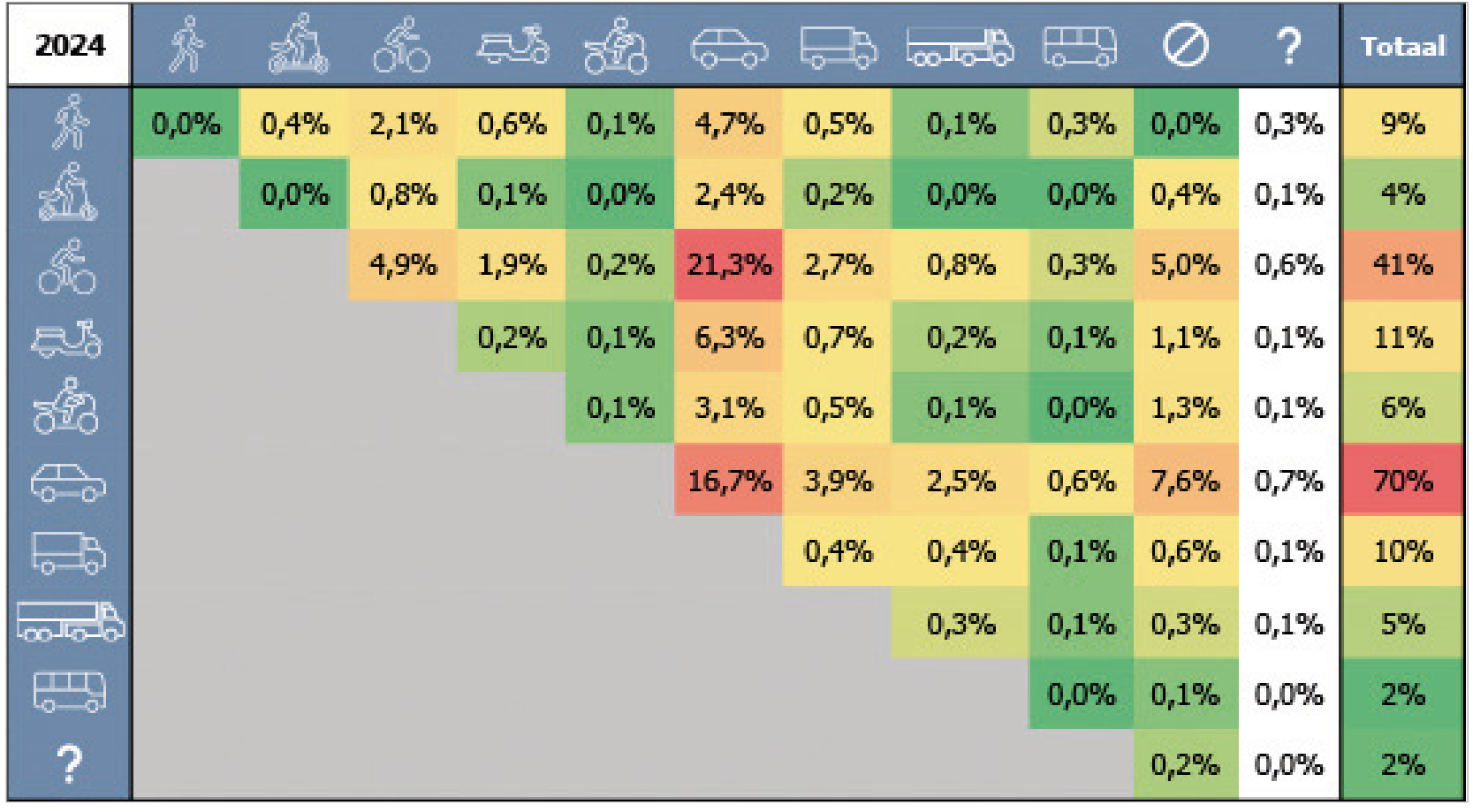
Gemma 4 added this description below it:
This table displays a collision matrix for the year 2024, showing the relative percentage of collisions between different types of road users, such as pedestrians, cyclists, and various motor vehicles. The data is organized in a triangular grid where the rows and columns represent different transport modes, with the "Totaal" column on the right showing the overall percentage of collisions for each mode.
The generated Markdown is not perfect. OCR errors remain possible, especially in small text and dense visual layouts. The example shows that a local pipeline can recover the document structure, retain the visual, and add a description without sending the PDF to an external service.
Links
- Unlimited OCR source repository
- Unlimited OCR paper
- Unlimited OCR model card and weights
- OmniDocBench
- Unlimited OCR documentation for MLX VLM
- PDF to Markdown converter
- Gemma 4 12B MLX model